Posts

Citrix ADC/NetScaler - EPA PRE Auth Policy: Hide "Skip Check" Button

Image
  The EPA "skip check" Button for Pre Authentication EPA Policys and NFactor is added only from the 13.0-45x+ Builds. So if you are using older Versions, your users don't have the option to skip the EPA check. If you want to hide this button please do the following: 1. Append the below css style in /var/netscaler/logon/themes/<customTheme>/style.css #skipbutton { display: none; } 2. Flush browser and ns chache for changes to reflect immediately. NS cache can be flushed using below command : flush chache contentgroup loginstaticobjects 3. since CWA opens webview, the portal changes will feflect there also. So any local cache of CWA must also be flushed for changes to take effect.

How to activate logging for Citrix Exploit 1 and 2

Image
Daniel Weppeler postet a link on how to activate Citrix Logging for Exploit 1 and 2: https://twitter.com/_DanielWep/status/1217022904073801728 #CVE201919781 #Citrix Create MessageAction: add audit messageaction MsgAct_CVE WARNING "\"CVE Attack from IP \"+CLIENT.IP.SRC+\" - URL: \"+HTTP.REQ.URL.PATH.HTTP_URL_SAFE+\" (headers: \"+HTTP.REQ.FULL_HEADER.HTTP_HEADER_SAFE+\")\"" -logtoNewnslog YES Enable userDefinedAuditlog: set audit syslogParams -logLevel ALL -userDefinedAuditlog YES set audit nslogParams -logLevel ALL -userDefinedAuditlog YES Bind #Syslog Message Action to CVE Responder Policy: set responder policy ResPol_Fix_CVE-2019-19781 -logAction MsgAct_CVE

How to check, if your NetScaler is affected by CVE-2019-19781: Citrix Exploit 1 and 2

Image
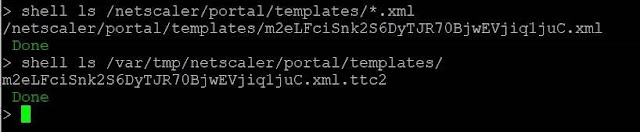
You can check if your NetScaler is affected by CVE-2019-19781 with following commands: Indicators of compromise To get an idea wether your Citrix ADC is compromised I’d recommend to perform (at least!) the following steps Template files The exploits all write files to two different directories. Scan those via: shell ls /netscaler/portal/templates/*.xml shell ls /var/tmp/netscaler/portal/templates shell ls /var/vpn/bookmark/*.xml If you find files similar to the following you are likely to be compromised Apache Log files In addition, attempts to exploit the system leave traces in the Apache httpaccess log files. Those you can validate via: shell cat /var/log/httpaccess.log | grep vpns | grep xml shell cat /var/log/httpaccess.log | grep "/\.\./" shell gzcat /var/log/httpaccess.log.*.gz | grep vpns | grep xml shell gzcat /var/log/httpaccess.log.*.gz | grep "/\.\./" The following output is found on a system that was exploited: Howev...

Additional NetScaler Vulnerabiliy to CVE-2019-19781: Citrix Exploit 2

Image
Information from Citrix Technology Professional Matthias Schlimm: Hello everybody,   An additional vulnerability was found in 2 HTTP HEADERN today, following CVE-2019-19781 from December 2019, i.e. All systems that have already passed the "Mitgation Steps from article https://support.citrix.com/article/CTX267679" cannot avoid making another change. Unfortunately, there is currently no official blog or supplement from Citrix available, so I can only share what I have received from Citrix sources here:     --snip --- There is a new attack against the CVE, it seems like it can exploit using 2 headers. You can read more about here: https://isc.sans.edu/forums/diary/Citrix+ADC+Exploits+are+Public+and+Heavily+Used+Attempts+to+Install+Backdoor/25700/I’ve updated my responder policy expression with:   HTTP.REQ.URL.DECODE_USING_TEXT_MODE.CONTAINS (“/ vpns /“) && (! CLIENT.SSLVPN.IS_SSLVPN || HTTP.REQ.URL.DECODE_USING_TEXT_MODE.CONTAINS (“/../“)) || http.req.hea...

Last stable running NetScaler 12.x version

Image
Like you may also experienced the last versions of NetScaler 12.x were so buggy that it is almost impossible to work correctly with them. After a short talk with colleagues I would recommend the version 12.0.56.20 as latest stable running version.

NetScaler: Issuer certificate mismatch

Image
After importing a PKCS#12 certificate on a customer NetScaler the error: "Issuer Certificate mismatch, or PEM pass phrase required for this private key". To solve this issue you need to re-export the certificate and uncheck the "Include all certificates in the certification path if possible" checkbox. It's a known bug at Citrix like you can read here: https://support.citrix.com/article/CTX226986

Implementing Single Sign On with NetScaler and Kerberos Constrained Delegation (KCD)

Image
I wrote a manual how you can realize a Single Sign on Solution with Kerberos KCD and NetScaler. It's possible to restrict the user delegation to certain services/protocols on a server. You'll need this if NetScaler is not knowing the user password. If it knows the user password you can realize the SSO with Kerberos Impersonation. This will be an extra post. Let's start with creating a KCD account. 1. Create KCD Accounts Create KCD Account in AD Password never expires should be chosen 1.1    Enable the delegation tab for this user You can activate it with setspn ( It is available if you have the Active Directory Domain Services (AD DS) server role installed) Needs to be run from an elevated command prompt setspn -A host/KCDTest@simon.ns simon\KCDTest 1.2 Choose the delegation option Here you need to chose "Trust this user for delegation to specified services only" and also "use any authentication protocol". ...